Print-on-Demand (POD) is one of the easiest ways to start selling products on Etsy without manufacturing or storing inventory. In this model, a seller uploads a design and a POD service handles printing and shipping. Popular products include T-shirts, hoodies, mugs, tote bags, and other accessories.
Artificial intelligence tools have significantly simplified the design process. AI image generators can quickly produce illustrations, graphics, and concepts that can later be prepared for printing on merchandise.
However, creating an image with AI is only the first step. To use a design for print-on-demand products, the file must meet several technical requirements, including resolution, file size, format, and transparency.
For most apparel products, designs are uploaded as PNG files with transparent backgrounds, and the maximum file size allowed by many platforms, including Etsy integrations, is 20 MB.
This guide explains the complete workflow: generating an image with AI, upscaling it to the correct resolution, preparing the final PNG file in Canva, creating product mockups, and optimizing listings for Etsy.
What Products You Can Sell with POD on Etsy
Print-on-Demand allows sellers to place designs on a variety of physical products.
Common POD items include:
- T-shirts
- Hoodies
- Sweatshirts
- Mugs
- Tote bags
- Hats
- Stickers
A single design can often be used across multiple products.
Common Design Styles
| Design Type | Example |
|---|---|
| Typography | Funny quotes or phrases |
| Minimal illustrations | Simple graphic artwork |
| Vintage style | Retro graphics |
| Meme designs | Internet humor |
| Niche humor | Profession or hobby jokes |
Choosing a niche is critical for Etsy success. Many successful stores focus on specific audiences, such as:
- pet owners
- specific professions
- hobbies
- sports fans
- gaming communities
Best AI Tools for Creating POD Designs
AI generators are commonly used to create illustrations that can be adapted for merchandise.
Midjourney
Midjourney is widely used by designers because it produces highly stylized illustrations.
Advantages:
- strong artistic styles
- good for vintage and retro artwork
- high visual quality
Limitations:
- works through Discord
- generates relatively small images that require upscaling.
DALL-E
DALL-E is known for accurately interpreting prompts and generating clean graphics.
Advantages:
- strong prompt understanding
- clean illustrations
- useful for minimal or cartoon styles.
Stable Diffusion
Stable Diffusion is an open-source image generation model.
Advantages:
- highly customizable
- many specialized models
- suitable for large-scale design generation.
How to Write Prompts for POD Designs
When generating artwork for merchandise, simple compositions work best. Complex backgrounds often make printing more difficult.
Example prompt:
vintage cartoon raccoon illustration, bold outline, t-shirt design, isolated on white background, retro colors
Helpful prompt keywords include:
- t-shirt design
- bold outline
- vector style
- sticker style
- isolated illustration
These help generate graphics that are easier to prepare for printing.
Design Sizes for T-Shirts, Hoodies, and Mugs (Pixels)
Most POD platforms use similar design sizes.
T-Shirts and Hoodies
| Purpose | Size |
|---|---|
| Standard design | 4500 × 5400 px |
| Small print | 3000 × 3500 px |
The size 4500 × 5400 pixels is the most common standard for apparel.
This resolution works well for:
- T-shirts
- hoodies
- sweatshirts
- tote bags.
Mugs
| Type | Size |
|---|---|
| Standard mug design | 2700 × 1120 px |
| Full wrap mug | 3000 × 1400 px |
Universal Design Size
A convenient size for most apparel designs is:
4500 × 5400 px
Using this resolution ensures the design prints clearly on most clothing products.
Image Size Generated by AI
AI generators typically create images that are smaller than required for printing.
Typical generation sizes:
| Tool | Size |
|---|---|
| Midjourney | ~1024 px |
| DALL-E | ~1024–1792 px |
| Stable Diffusion | ~1024–2048 px |
Therefore, AI is mainly used to create the initial artwork, which must later be enlarged.
Upscaling the Image for Printing
The final target resolution for apparel designs is:
4500 × 5400 px
A typical workflow looks like this:
- Generate the design (~1024 px)
- Upscale to around 3000 px
- Upscale again to 4500 px
Upscaling in multiple steps usually produces better results than enlarging the image all at once.
Tools for Upscaling AI Images
Several AI tools are commonly used to increase image resolution:
- letsenhance.io
- magnific.ai
- upscale.media
- topazlabs.com
These tools increase image size while attempting to restore missing details.
Preparing the Design in Canva
Canva is one of the easiest tools for preparing POD design files.
Creating the Canvas
In Canva:
- Click Create Design
- Choose Custom Size
- Select pixels
Enter the following size:
4500 × 5400 px
Placing the Design
After uploading the upscaled image:
- center the design
- ensure it does not reach the edges of the canvas
- remove any background if needed.
The background should be transparent for clothing designs.
Designing Directly in Canva
Some designs are created entirely inside Canva using:
- typography
- icons
- vector graphics.
If you build the design directly in Canva, always start with the correct canvas size:
4500 × 5400 px
Exporting the File
The recommended export format is:
PNG
Export settings:
- PNG format
- transparent background
- maximum quality.
The final file size is usually 5–15 MB, which stays within the 20 MB limit used by many platforms.
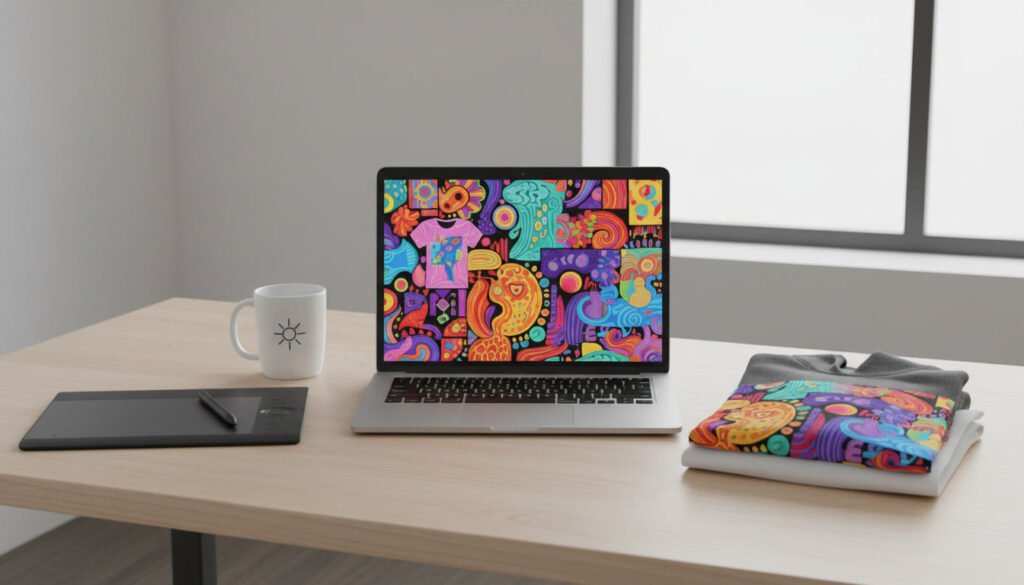
Creating Mockups for Etsy Listings
Mockups show how a design looks on a real product. They are an essential part of Etsy listings because they help customers visualize the item.
Common mockups include:
- T-shirts worn by models
- hoodies on mannequins
- mugs on a table
- flat-lay product photos.
High-quality mockups often improve click-through rates in search results.
Where to Get Mockups
There are several ways to obtain mockups for POD products.
POD Platforms
Many services automatically generate mockups.
Common platforms include:
- Printify
- Printful
These services produce product images once a design is uploaded.
Mockup Generators
Online tools can generate lifestyle mockups.
Examples include:
- Placeit
- Smartmockups.
Mockup Marketplaces
Design marketplaces sell professional mockup bundles for apparel and merchandise.
Examples include:
- Creative Market
- Etsy mockup packs.
How Many Mockups to Use
Etsy allows up to 10 images per listing.
A typical structure might include:
| Image Type | Quantity |
|---|---|
| Main product image | 1 |
| Lifestyle mockups | 2–3 |
| Close-up view | 1 |
| Different product colors | 2 |
| Informational graphic | 1 |
Informational graphics can display sizing charts or product details.
Etsy SEO for POD Products
Titles and descriptions should include relevant keywords.
Example product title:
Funny Cat T-Shirt | Cat Lover Shirt | Cute Cat Graphic Tee | Gift for Cat Owner
Common keywords include:
- graphic tee
- funny shirt
- vintage t-shirt
- gift for
- funny gift idea.
Common Mistakes
Using images that are too small
Designs smaller than 3000 pixels may appear blurry when printed.
Missing transparent background
Apparel designs should use transparent PNG files.
Overly complex illustrations
Very detailed artwork may not print clearly on fabric.
Conclusion
AI tools have made it much easier to create artwork for print-on-demand products on Etsy. Designers can quickly generate illustrations and concepts that can be turned into merchandise such as T-shirts, hoodies, and mugs.
However, successful POD designs require more than just AI generation. The image must be properly prepared for printing, which means upscaling it to the correct resolution, placing it on a correctly sized canvas, and exporting it as a high-quality PNG file with a transparent background.
A widely used standard for apparel designs is 4500 × 5400 pixels, which provides sufficient resolution for most clothing products while staying within common file size limits.
In addition to technical preparation, successful Etsy listings also depend on strong mockups and effective keyword optimization. Combining well-prepared design files, clear product visuals, and optimized listings can significantly increase the chances of building a profitable print-on-demand store.