A Step-by-Step Guide to Creating a More Realistic AI Voice
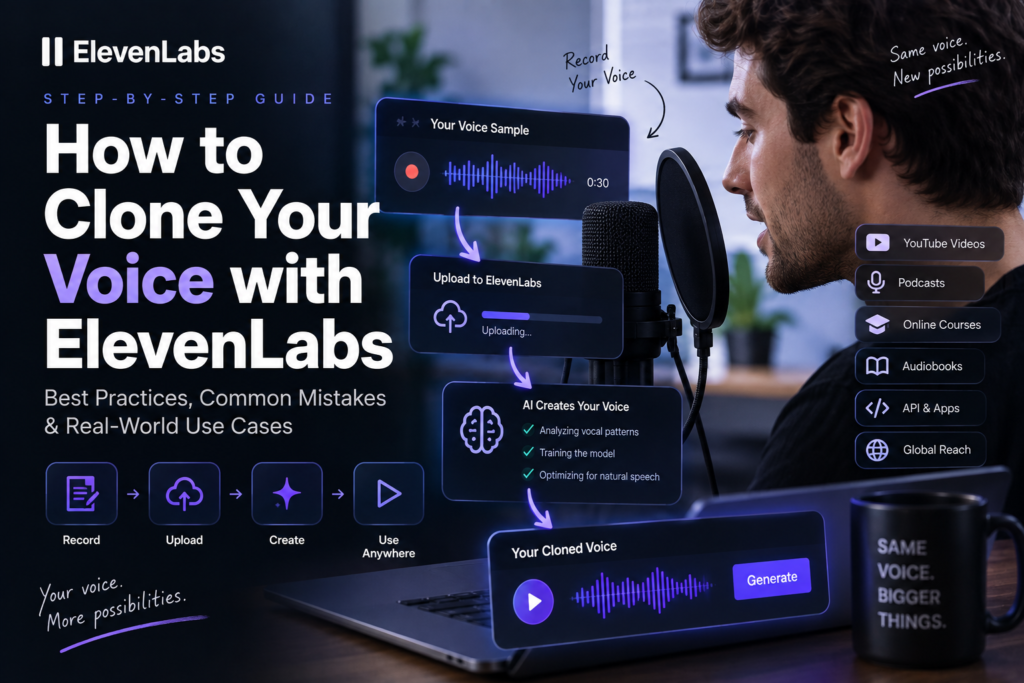
Creating a voice clone is technically simple. Creating a good voice clone requires more attention.
This distinction matters because many users upload the first audio recording they can find, generate a voice, and then judge the technology based on disappointing results. In reality, the quality of the source material has a major influence on how accurately an AI system can reproduce a voice.
A successful workflow starts before you upload anything to ElevenLabs. You need reasonably clean audio, a voice sample that represents how you actually speak, and enough variation for the system to capture your pronunciation and vocal characteristics.
The following process explains how to approach voice cloning in a practical way.
Read more: https://aiworkflowtips.com/elevenlabs-voice-cloning-explained-2026-part-1/
Step 1: Prepare Your Voice Recording
The first step is not opening the voice cloning tool.
The first step is preparing the audio.
Your recording acts as the reference material from which the AI learns the characteristics of your voice. If that reference contains background noise, music, aggressive compression, or inconsistent volume, those issues can affect the final result.
You do not necessarily need a professional recording studio. A quiet room and a decent microphone can be enough for many creator workflows.
What matters most is clarity.
Try to record in an environment with minimal:
- background conversations;
- traffic noise;
- music;
- keyboard sounds;
- echo;
- microphone distortion.
It is also worth recording naturally. Don’t suddenly use an exaggerated “radio voice” if you normally speak in a relaxed and conversational way.
The AI can only learn from the voice you provide.
If your goal is to create a voice for YouTube tutorials, record the type of speech you would normally use in a YouTube tutorial. If you plan to use the voice for storytelling, provide samples that include some natural variation in pacing and expression.
The closer your source material is to your intended use case, the more useful the resulting clone is likely to be.
Step 2: Choose the Right Type of Voice Clone
Before uploading your recording, consider what you actually need the cloned voice for.
Not every project requires the same level of voice accuracy.
For example, a creator who wants to produce additional YouTube voiceovers may prioritize speed and convenience. A company building a long-term audiobook product may place greater importance on consistency and voice fidelity.
A simple way to think about the decision is this:
| Your Goal | What Matters Most |
|---|---|
| YouTube videos | Natural sound and fast production |
| Podcasts | Consistency and conversational delivery |
| Audiobooks | Stability during long-form narration |
| Courses | Clear pronunciation and comfortable pacing |
| AI applications | Scalability and API integration |
| Brand voice | Consistent identity across content |
The important point is that a voice clone should be evaluated according to its intended purpose.
A clone that works perfectly for short YouTube videos may not necessarily be the best option for several hours of audiobook narration.
Step 3: Upload Your Voice Sample
Once your audio is ready, you can upload it as the reference material for the new voice.
This is the point where many beginners expect the platform to create a perfect digital duplicate automatically.
That expectation is unrealistic.
Voice cloning is not the same as making an audio copy.
The AI needs to infer patterns from the material you provide. The more useful information contained in the sample, the better the system can understand characteristics such as pronunciation, rhythm, tone, and vocal range.
A strong sample usually gives the AI an opportunity to hear you speaking naturally across multiple sentences rather than repeating the same short phrase.
For example, this type of sample provides limited variation:
“Welcome to my channel. Welcome to my channel. Welcome to my channel.”
A more natural recording gives the system more useful information:
“Today we’re going to look at how AI voice technology is changing content creation. I’ll explain how voice cloning works, where it can save time, and what you should consider before using it for your own projects.”
The second example includes changes in sentence structure, rhythm, emphasis, and intonation.
That is generally more representative of natural speech.
Best Recording Practices for Voice Cloning
The recording stage deserves more attention than most people give it.
You can think of voice cloning as similar to teaching someone how to imitate your speaking style. If they only hear you through a poor phone connection while traffic is passing in the background, they have less useful information to work with.
The same principle applies here.
Use Clean Audio Whenever Possible
Clean audio does not mean expensive audio.
A reasonably clear recording made in a quiet room can be more useful than a professionally recorded clip that contains music, sound effects, or multiple speakers.
The AI needs to identify your voice.
Anything competing with that voice makes the source material less focused.
Before uploading a recording, listen to it from beginning to end and ask:
- Can I hear the speaker clearly?
- Is there another person speaking?
- Is there noticeable background music?
- Does the volume change dramatically?
- Is there heavy echo or distortion?
If the answer reveals significant problems, it may be worth recording a new sample.
Speak Naturally
One of the easiest mistakes is trying too hard.
When people know they are recording a sample for AI, they sometimes start speaking in an unusually dramatic or unnatural way.
That can create a mismatch later.
If your clone is trained primarily on highly energetic speech but you want to use it for calm educational content, the result may not represent the voice you actually want.
Instead, speak naturally while allowing normal variation.
Change your pace slightly.
Use normal pauses.
Allow your voice to rise and fall as it would in a real conversation.
A natural voice sample generally provides a better foundation than a performance that is artificially exaggerated.
Avoid Heavy Audio Processing
It can be tempting to run your voice recording through several enhancement tools before uploading it.
Some basic cleanup may be useful, especially when removing obvious background noise. However, excessive processing can also remove or alter the characteristics that make your voice unique.
Heavy compression, aggressive noise reduction, or strong vocal effects can change:
- vocal texture;
- dynamics;
- natural breathing;
- frequency balance;
- perceived tone.
The goal is not to make the recording sound like a heavily produced radio advertisement.
The goal is to provide a clear representation of the original voice.
Common Mistakes That Can Ruin a Voice Clone
Voice cloning tools have improved significantly, but they are not immune to poor input.
The following mistakes are among the most common reasons people get disappointing results.
Mistake 1: Using Audio with Multiple Speakers
This is one of the most obvious problems.
If your recording contains several people talking, the AI may have difficulty identifying which vocal characteristics belong to the target speaker.
A podcast episode, interview, or video clip with multiple participants may therefore be less suitable than a recording focused entirely on one person.
For the best possible starting point, use audio where the target speaker is clearly isolated.
Mistake 2: Using Music Under the Voice
Background music may make a YouTube video more entertaining, but it is usually not ideal training material.
Music occupies many of the same audio frequencies used by human speech. It can also mask subtle details that help distinguish one voice from another.
If you want to use a section from an existing video, try to find an original recording without the final soundtrack.
A clean voice track is generally more useful than the finished video audio.
Mistake 3: Recording Too Quietly
Very quiet recordings can create problems because important vocal details become less distinct.
At the same time, recording too loudly can cause clipping and distortion.
The goal is a comfortable, consistent level.
You should be able to hear your voice clearly without the microphone sounding overloaded.
If certain words sound distorted or “crunchy,” the recording may be too loud.
Mistake 4: Expecting Every Script to Sound Perfect
Even an excellent voice clone can produce different results depending on the text.
This is especially important for creators who generate scripts with AI.
Long sentences can cause awkward pacing. Unusual punctuation can create unexpected pauses. Technical terms, names, and abbreviations may not always be pronounced as intended.
For this reason, voice cloning and script writing should be treated as connected parts of the same workflow.
A good voice needs a script written for spoken language.
What Can You Build with ElevenLabs Voice Cloning?
Voice cloning becomes much more interesting when you stop thinking about it as a novelty feature.
The real question is not:
“Can AI copy my voice?”
The more useful question is:
“What can I do once my voice can generate new speech automatically?”
This is where the technology becomes commercially and creatively interesting.
A cloned voice can potentially become part of a repeatable content or software workflow.
Instead of manually recording every piece of content, you can create text and generate new audio when needed.
Here are some of the most practical applications.
| Project | Difficulty | Potential Scale | Main Advantage |
|---|---|---|---|
| YouTube Channel | Easy | High | Faster voiceover production |
| Podcast | Medium | High | Easier corrections and updates |
| Online Course | Easy | High | Consistent narration |
| Audiobook | Medium | Very High | Large-scale production |
| Language App | Medium | Very High | Personalized learning |
| AI Assistant | Advanced | Very High | Unique conversational voice |
| SaaS Product | Advanced | Very High | Voice as a product feature |
| Customer Support | Medium | High | Consistent automated communication |
The table provides a useful overview, but each application has very different requirements.
Let’s look at them individually.
Voice Cloning for YouTube Channels
YouTube is one of the most obvious use cases for AI voice cloning.
Recording voiceovers can become a production bottleneck, particularly for creators publishing frequently.
A typical workflow may involve:
- Writing a script.
- Recording the narration.
- Listening for mistakes.
- Recording incorrect lines again.
- Editing the audio.
- Synchronizing it with the video.
For a short video, this might not be a major problem.
For a channel publishing several videos every week, however, the time adds up quickly.
A cloned voice changes the workflow.
Instead of recording every script manually, the creator can prepare the text, generate the narration, review the result, and make corrections where necessary.
This can be particularly useful for:
- faceless YouTube channels;
- educational channels;
- software tutorials;
- business explainers;
- list-style content;
- AI news channels.
However, voice cloning should not be treated as an excuse to remove all human quality control.
The best workflow is usually:
Write → Generate → Listen → Edit → Export.
Skipping the listening stage is one of the fastest ways to publish unnatural-sounding AI content.
Voice Cloning for Podcasts
Podcasting is another interesting use case, although it requires a slightly different approach.
Podcasts are often more conversational than YouTube voiceovers. Listeners can spend thirty minutes, one hour, or longer listening to the same speaker.
This makes consistency particularly important.
A cloned voice could potentially help with tasks such as correcting mistakes, creating introductions, recording advertisements, or generating short additional segments.
For example, imagine recording an entire podcast episode and later realizing that a product name was mentioned incorrectly.
Traditionally, you would reopen the recording setup, match the microphone position, record the corrected sentence, and edit it into the episode.
With a high-quality voice clone, the correction workflow may become considerably faster.
That does not necessarily mean AI should replace the entire human podcast.
For many creators, a hybrid approach makes more sense.
The real host records the main conversation, while AI helps generate updates, corrections, short promotional content, or multilingual versions.
Voice Cloning for Online Courses
Online education is particularly well suited to voice automation.
Courses often contain dozens of lessons. Updating the content can become complicated when each lesson requires manual narration.
Suppose you have created a course about AI tools.
Six months later, one of the tools changes its pricing structure.
Without AI voice technology, updating the lesson might require:
- rewriting the script;
- reopening the recording setup;
- recording the new section;
- editing the lesson;
- synchronizing the audio.
With voice cloning, you can potentially update the script and regenerate the affected narration.
This creates a more flexible production system.
For course creators, the main advantage is not necessarily replacing human recording.
It is making content easier to maintain.
Affiliate Disclosure
Some links in this article are affiliate links. If you choose to purchase a product or subscription through one of our links, we may receive a commission at no additional cost to you.
Our goal is to recommend tools based on their usefulness for creators, developers, and businesses rather than simply promoting products because they offer an affiliate program.