
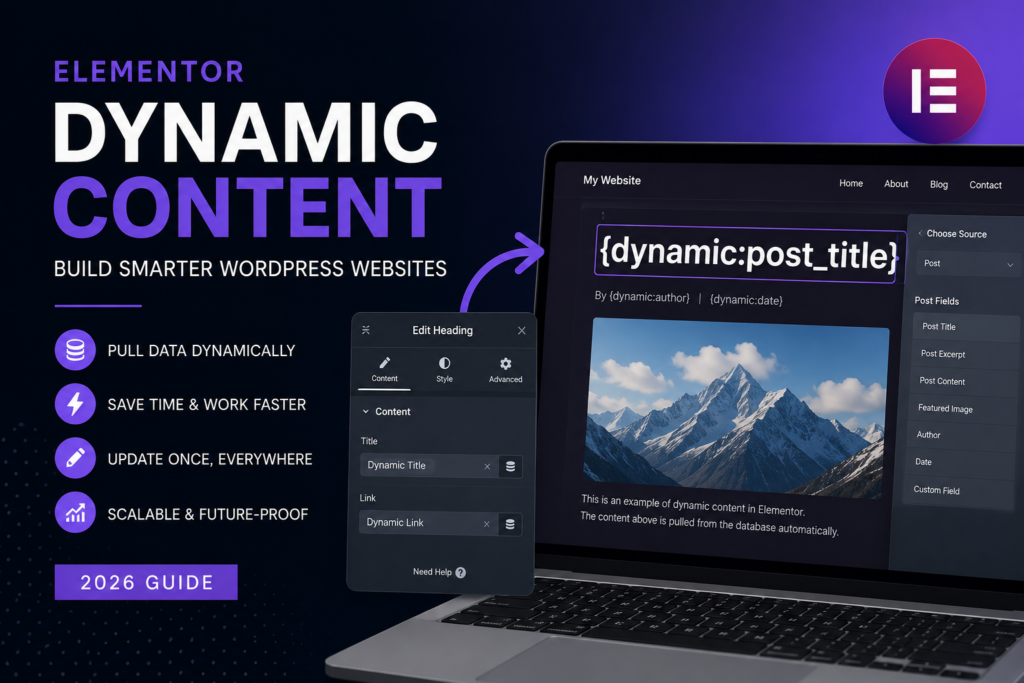
Static websites are becoming obsolete for anything beyond simple landing pages.
If you’re building:
- content sites
- affiliate blogs
- client websites
- SaaS landing pages
- eCommerce stores
you need dynamic systems.
Key Benefits
1. Scalability
Create one template and reuse it across hundreds of pages.
2. Efficiency
Update content once — it updates everywhere.
3. Consistency
No more mismatched layouts or outdated data.
4. Personalization
Show different content based on:
- user behavior
- location
- login status
5. AI Integration
Dynamic content pairs well with AI tools:
- AI-generated text stored in custom fields
- automated content pipelines
- programmatic SEO pages
This is where most sites still lag — and where the opportunity is.
How to Use Dynamic Content in Elementor (Step-by-Step)
To use dynamic content, you need the Pro version of Elementor.
Step 1: Create Custom Fields
Use tools like:
- Advanced Custom Fields (ACF)
- JetEngine
Create fields such as:
- price
- rating
- author
- product specs
These fields store structured data.
Step 2: Add Dynamic Tags in Elementor
In Elementor:
- select a widget (text, image, button)
- click the Dynamic Tags icon
- choose your data source (e.g., ACF Field, Post Title)
Elementor will automatically pull that data into your design.
Step 3: Build Templates Instead of Pages
Instead of designing pages individually:
- create a Single Post Template
- create a Custom Post Type template (e.g., listings, products)
Elementor will populate each page dynamically.
This is the core shift:
You design systems, not pages.
Step 4: Use Theme Builder for Full Control
With Elementor Theme Builder, you can create:
- dynamic headers
- dynamic footers
- blog post layouts
- WooCommerce product pages
Each part of the site updates automatically based on data.
Step 5: Connect Dynamic Content with AI
This is where things get more interesting in 2026.
You can:
- generate content with AI
- store it in custom fields
- display it dynamically across pages
Examples:
- AI-generated product descriptions
- automated blog content
- dynamic landing pages for SEO
This approach is widely used in:
- affiliate sites
- content farms
- niche SEO projects
But quality control matters — otherwise you just generate low-value pages.
Real Use Cases
1. Affiliate Websites
Create templates for:
- product reviews
- comparison pages
- tool listings
Populate them with dynamic fields.
2. Client Websites
For example:
- real estate listings
- service directories
- portfolio sites
Clients can update content without breaking design.
3. Programmatic SEO
Generate hundreds of pages like:
- “Best tools for X”
- “AI tools in [industry]”
Each page pulls structured data dynamically.
Common Mistakes to Avoid
1. Treating Elementor Like a Static Builder
If you’re still designing page-by-page, you’re wasting time.
2. Overcomplicating Custom Fields
Too many fields = messy backend.
3. Ignoring Performance
Dynamic sites can slow down if poorly optimized.
4. Using AI Without Structure
AI + dynamic content works only with clean data.
Pro Tips for Better Results
- Keep field naming consistent
- Use global templates
- Combine dynamic content with reusable sections
- Optimize database queries
- Cache dynamic pages when possible
Is Dynamic Content Worth Learning?
Yes — but only if you plan to build more than simple websites.
If you:
- build client sites
- run affiliate projects
- scale content websites
then dynamic content is not optional anymore.
Final Thoughts
Dynamic content turns Elementor from a visual editor into a powerful website system.
But here’s the reality:
Most people never go beyond basic Elementor usage.
That creates an opportunity.
If you learn dynamic content — and combine it with AI and automation — you move from “page builder” to someone who builds scalable digital assets.
FAQ
What is dynamic content in Elementor?
Dynamic content allows Elementor to pull data from WordPress and display it automatically.
Do you need Elementor Pro for dynamic content?
Yes, dynamic tags and Theme Builder are only available in Elementor Pro.
What is the best plugin for dynamic content?
ACF and JetEngine are the most popular options.
Can I use dynamic content for SEO?
Yes, it’s widely used for scalable content and programmatic SEO.
You might also like: Why Elementor Is Still One of the Best Page Builders for WordPress (2026)
Affiliate Disclosure
Some links in this article are affiliate links. If you choose to use them, we may earn a commission at no extra cost to you.
We focus on practical tools that are commonly used in real-world workflows.